Sunday, March 18, 2012

Club Bear Instructional Videos - Your New PVP Bible

Club Bear is a corporation that both Pwned Factor and The Seventh Day have close ties with. The videos made by Kil2 are famous throughout EVE Online and they are the closest thing to bonafide "PVP Instructional Videos" that you will ever see.


Club Bear Video Linkage
(link Below)
http://www.club-bear.com/videos/


If you have any problems playing these videos [because they are MKV video files] download this video player. VCL player is actually pretty awesome, it literally plays anything. It is free and clean of all spyware, so just ignore the advertisements on the main page and you're good to go Grin


Link Below:
http://www.videolan.org/vlc/


ONE OF THE BEST THINGS that you will get to see in these Club Bear videos are how and when to overheat your modules in PVP. This is something that is truly impossible to explain, and being able to watch the hands of a master at work is simply priceless. Wink


IF YOU WANT TO GET THE MOST OUT OF THESE GUIDES


I strongly urge you to watch the video titled "Seven" in full, from beginning to end, at least once. This requires just 27 minutes of your life which is nothing in the grand scheme of how much time we waist playing EVE Online. That single video will demonstrate to you what is possible in PVP if you just take the instruction that you will receive here to heart. All of this is for you, the new player, all you have to do is learn how to apply the knowledge that has been provided to you in these guides towards your game play. In the "Seven" video, you will see ships from almost every race do things that you did not think were possible.


And you will also learn the meaning of "Konichiwa Bitches!" Cheesy

Preparing Your EVE Client For PVP

Your EVE Client DOES NOT come optimized for PVP . . . CCP makes you do it yourself Huh


This is a guide on how to prepare and optimize your client for an optimal PVP experience


STEP 1.) EVE Game Settings


I.) Enter the game then hit escape
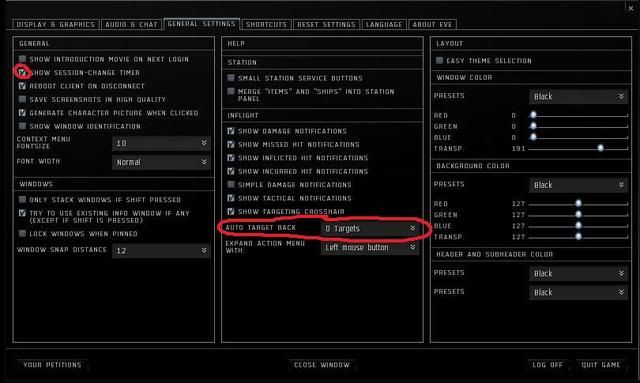
2.) Go to the general settings tab and check "Show Session Change Timer"
3.) Select the "Autotarget Back" pull down and set that to 0


The Session Change Timer

What you have just done is made it so you can see the game's "Session Change Timer" AKA EVE Online's invisible loading bar. It will now appear as a tiny clock in the upper left hand corner of your screen when you dock, undock, join a fleet and do all kinds of other things in game. Being able to see this load bar will allow you to accomplish all kinds of neat little PVP tricks that you wouldn't be able to accomplish otherwise. Trust me on this . . . it is awesome.


Why You Want Auto Target 0


I will explain why this is important later on, ATM all you need to know is that you don't want to autotarget someone back when they target you. It makes life difficult in PVP, and on top of that, it will end up getting you killed when things go down hill and it is time to escape and save your ship. By doing this one thing, you have just DRASTICALLY increased your likely hood of survival when the unforeseen happens . . . and it WILL happen. See Aggression Mechanics section in order to understand why.


Standard Overview Settings


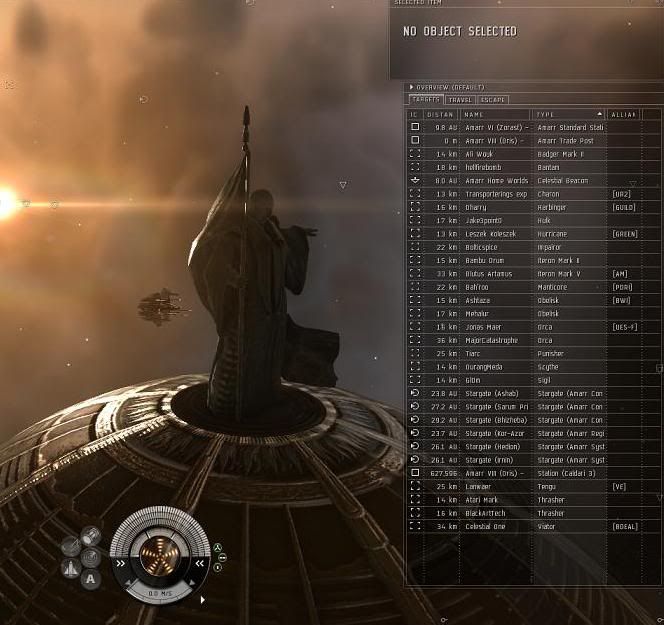
That is allot of clutter yes? Imagine if you were inside of an asteroid belt and 30+ asteroids were added to that mess . . . or better yet, what if each of those ships had their drones in space? :shock: You would see each and every drone, that is 5 drones per ship. Your overview would become filled with so much garbage that it would be impossible to find the target that you are trying to shoot at. This is bad and will lead to both your death and the death of your fleet mates.


Here Is How You Fix This Problem


Instructions


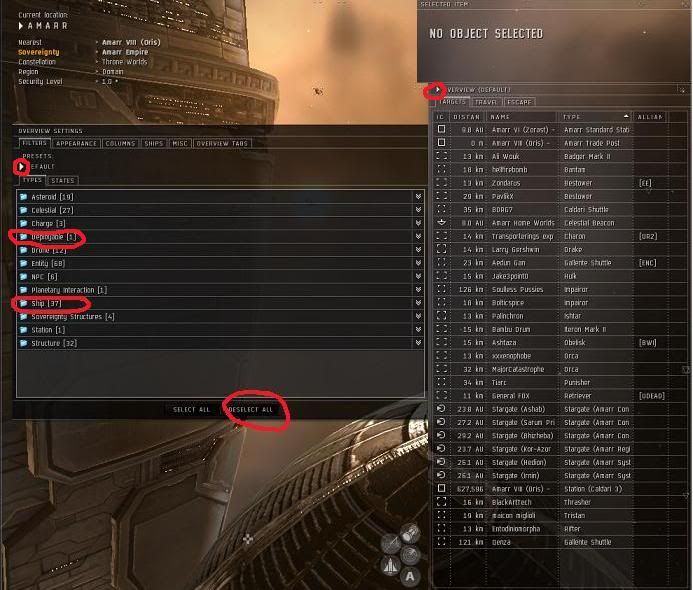
1.) At the very top of the Overview there is a little arrow pointing to the word "Overview Settings" Right click that little arrow and open up the Overview Settings window.
2.) Once there, hit the "Deselect All " button at the bottom that I circled. Your Overview will now go blank.
3.) Now find the folder that says "ships" right click that and hit select all.
4.) After that, find the folder that says "Deployable" [it is the fourth down from the top] right click it and select all.

Update:
5.) ALSO under the "Celestial" section please select "Beacon" (it is the fourth one down in that section)


Now you have a nice clean Overview that only shows ships, pods and warp bubbles which are good to have in your overview just in case you ever end up in 0.0 space. You will now see no drones, no asteroids and no mountain of crap. But you are not done yet...

By the same token, you don't want to see any of your friends in your overview either. The reason for this is that if you are in a 10 man gang, and you are fighting another 10 man gang, you then have 20 ships in your overview + any other random ship that might be around at the time. This can lead to bad things, like you might accidentally shoot one of your own fleet mates.


To Further Reduce Overview Clutter


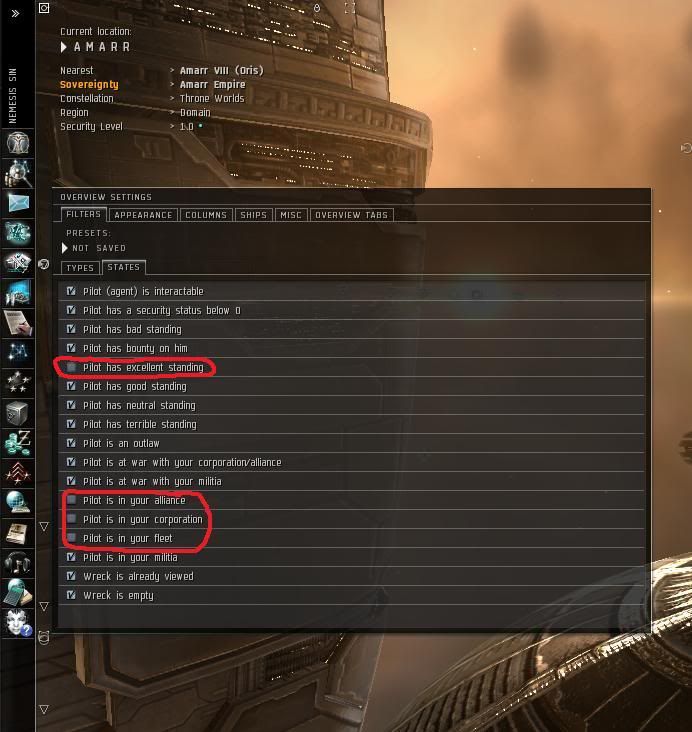
Under the "States Tab" right beside the "Types Tab" UNCHECK the following

1.) Pilot has excellent standing
2.) Pilot is in your corporation
3.) Pilot is in your fleet
4.) Pilot is in your alliance.


Once you have done ALL OF THE ABOVEgo to the top of that same window. There is a little arrow under "Presets" right click it and "Save Current Type Selection As"


Name It, and save it as Targets


YOU ARE STILL NOT DONE

Cheesy Cheesy Cheesy Huh Cheesy Cheesy Cheesy

Did you notice that I actually have 3 tabs in my overview sitting side by side? You are going to need at least those 3 available to you at all times as well...


1.) The Navigation Tab


When you are in a gang, the fleet commander will set a course and you will be jumping from stargate to stargate. In order to do this as efficiently as possible, you will need a dedicated tab that shows everything that your new "Targets" tab shows you + all of the stargates in space. Making this new tab is simple, all you have to do is right click the top of the Targets tab that you just made, and select "Add New Tab" That will create a second tab [you can have a maximum of five tabs open in your overview] Name that new tab "Navigation" After you do that, all you have to do is find a stargate anywhere in space and right click on it. You will see the option "Add To Overview", do it and your set.


Now simply go back to "Save Current Type Selection As" save it and and name it Travel


2.) The Escape Tab


This tab will make it so you NEVER GET PODDED AGAIN, provided that you are not stuck inside of a warp bubble inside of 0.0 space of course Cheesy (There is no way to get your pod out of those, which is why we have cheap Jumpclones to switch into when we decide to PVP in 0.0.) But beyond that, your good, and this tab setting is worth its weight in the amount of ISK it will save you. All you need to do is create a third tab, and in the Overview Settings Window hit the deselect all button. Find the "Celestial" folder [it is the second one down] open it and scroll down to "Moons" Check ONLY Moons You should now have a third tab that only has moons in it. Right?


Save that one as "Escape"


Tell Me Why I Need An Escape Tab Again?


When your ship is going up in flames, you now have an incredibly easy way to get your pod out of harms way and save your expensive implants. When your ship is going into structure and you know that you are about to die, simply switch from your "Targets Tab" over to your "Escape Tab" Select a random moon with one click of your mouse, and then spam the "Warp Button" at the top of your overview until your ship explodes. Once your ship does finally blow up, your pod will instantly warp to safety.


This is why people like me can fly around Empire during wartime with 1 Billion Isk worth of implants plugged into my head. Learn to do this neat little trick and mark my words you will NEVER GET PODDED AGAIN Wink How cool is that?


Summary


Now You Have


1.) A session change clock in your upper left screen when you dock and undock.
2.) 3x Tabs in your Overview, with three distinct settings in each one "Targets" "Travel" and "Escape"
3.) You only see ships and pods belonging to pilots not in your Corp, Fleet or Alliance in your main PVP tab named "Targets"
4.) You only see moons in your "Escape" tab and nothing else.
5.) Unless your in Nullsec you won't ever get podded again? Right? Wink


This is one of the most important things you need to do as a PVP'er, so if there is something in this thread that you don't quiet get (even though it was all circled in crayon) ask Eternum and make sure you get your client side settings right. Miss out on this part, and you will be feeling it for the rest of your character's life in EVE Online.

Aggression Mechanics - "How The F*ck Did He Do That?"


Aggression mechanics is just a fancy term used to describe EVE Onlines "Loading Bar" We PVP vets like to call it "Aggression Mechanics" because it impresses Carebears and Noobs like you
Grin


But seriously . . .


EVE's little loading bar is what separates the winners from the epic-fail losers. There is allot to all of this, but I am going to attempt to streamline it as best I can for simplicities sake. To best do this and avoid a massive wall of text that will make your brain hurt and your eyes bleed, I will use bulletins!


What Every PVP'er Needs To Know

I). When EVE is "Loading" essentially the game freezes up for either you, or the other guy that's trying to shoot at you. You need to know that the game "Loads" for approximately 10-20 seconds (It used to always be 30 seconds but recent changes to EVE has made the load time shorter) Technically we call this a "Session Change" but in reality it is just a stupid loading bar.


II.) This happens when you Undock, Dock, Join A Fleet, and Cross A Stargate. Yes . . . EVE Online loads just like a Playstation 3.


So Yea, EVE Has A Loading Bar? So How Does This Help Me Kick Ass In PVP?


Well for starters, when you undock you are COMPLETELY INVULNERABLE for a full 10-20 seconds, provided that you don't give any commands to your ship. That means no direction changes, no modules activated . . . nothing. You are totally invulnerable, you can't even be targeted. This is because of the "Session Change"


Wait So Dumb Carebears Afraid To Undock In Wartime . . . Really Are Just Being Dumb Carebears???
Shocked


Well. . .yea. I am not writing this up to tread softly. Unless you just happen to be undocking from one of those "Kick Out Stations" that eject you past the docking perimeter, you can undock into a massive blob of hostile ships and simply redock after 10-20 seconds without an issue. They can't even target you. If you don't believe me, grab a friend and test this out for yourself.


Pro Tip: You can hit Ctrl-Spacebar on your keyboard and stop your ship without breaking your invulnerability. That comes in handy when playing docking games on a station that has a tiny docking perimeter.


I have read on the official E-forums more then once, that people wish that they could see what is sitting outside of their station during wartime. Well...stations don't need windows because they have Session Change Timers! 8-)


NOTE if you join a fleet, you wont be able to cross a stargate for 10-20 seconds because entering a fleet causes a Session Change. This is especially important if you are passing through hostile territory, because if you don't realize this you will be stuck there sitting on a Stargate until the Session Change

NOW FOR THE AGGRESSIVE PART OF "AGGRESSION MECHANICS"


I Am Going To State This As Simply As Possible


If you SHOOT AT ANYTHING in EVE Online, you are committing yourself to a full 60 seconds of combat. As soon as you open fire with your guns, you have what is called an "Aggression Timer" and that timer, unfortunately, is completely invisible [meaning that there is nothing you can do to the client to make it visible]


The "Session Change Timer" and the "Aggression Timer" are two separate things. I'll say it again and underline it for good measure they are TWO separate things!


Did I mention that the Session Change Timer and The Aggression Timer are Two separate things yet? Wink


When you have an Aggression Timer [which is different then a Session Change timer] you can't dock at a station or cross a Stargate. This is one of the most important things that you will have to remember in PVP, because THIS alone will make or break everything that you do. So pay very close attention to this next part . . .


So This Guy Named "Bill" And This Guy Named "Spooge" Are Sitting Outside Of A Station


Now, Bill belongs to a small 10 man corporation, where as Spooge belongs to a much larger 100 Man Mercenary Alliance. Bill is pretty much screwed because his CEO never logs on and the rest of his corp are inactive. Bill however is a smart Pod pilot, and he has read this thread about Aggression Mechanics. Bill knows that as long as he is chilling at 0km near a spacestation, he is 100% safe from Spooge's evil mercenary alliance [I hear they torture kittens :shock:]


So yea, Spooge is a major dick, so he trash talks Bill and starts shooting at him . . . hoping that Bill will get pissed and fire back. What Spooge is looking to do, is make Bill have a 60 second Aggression Timer so the rest of Spooge's 12 man gang [who are all waiting in the next system] can jump into system and push Bill's Sh*t in 12 VS 1.


Bill, being the smart man that he is [because he read this forum post about Aggression Timers] does not fire back, and because he doesn't he can instantly dock back into the station. He knows that if he had fired back, he would have been unable to dock for a full 60 seconds, and very soon their after he would have had a sore backside. Being gang banged by 12 pilots is a very unpleasant experience. Bill then commences to undock, and redock over and over again just so he can piss off Spooge . . . and since you are invulnerable for 30 seconds after you undock [do to "Session Change Timers", which are totally different then "Aggression Timers" Clear on that yet? Wink ] Spooge can't do a damn thing about it...


Bill, having his fun, then decides that he has had enough and leaves system. The only thing is that he chooses the wrong stargate Shocked and suddenly he his looking down the barrels of 12 hungry prison inmates looking to have their way with him. Is Bill done for?Huh


Yes Or No? [The Answer Is No]


Bill, being the smart man that he is [because he read this forum post] knows that if he burns back to the stargate, AND DOES NOT FIRE BACK he will NOT have an Aggression Timer and he will be able to pass through it. His attackers however will have aggression, because they all will be shooting at him. Bill knows that if he can just make it back to the gate, he will have an easy getaway. Without aggression he will be able to pass through the stargate and yet his attackers, who have aggression, will be stuck sitting in that system for a full 60 seconds . . . giving him more then enough time to escape.


So Bill Burns Back To The Gate, he overheats his MWD and his Armor Repairer and just barely makes it back to the Stargate. He jumps through . . . his attackers cant. Bill is safe, and what is even better is that he meets Spooge on the other side . . .


Do You See What Bill Has Just Done?


He has created a window of 60 seconds where Spooge's 12 man fleet cannot come to his aid. He has isolated Spooge from the rest of his fleet, and 60 seconds is long enough for Bill to splatter Spooge's brains all over his windshield . . . Bill kills Spooge, docks and feels pretty damn good about himself afterward.


Bill then thinks about how glad he is that he read this post and paid very careful attention to what Eternum Praetorian wrote here. . .


Divide, Isolate, Kill And Conquer


Do you remember how I said "You will be learning how to force Solo PVP and small gang encounters upon the enemy?" You know, in the very first section entitled "The PwnedZone" that you were supposed to read? :lol: This is what I was talking about . . .


Remember the lessons of Bill And Spooge young one. Eve's invisible loading bar makes you invulnerable for 10-20 seconds, and Aggression Timers means you can't dock or cross a stargate for 60 seconds BOTH can work to your advantage! And if you want a video representation of someone accomplishing this Kil2 is your man.


http://www.club-bear.com/videos/

^^^^ Go to that link, and download the Video "Ursa Unleashed" Fast forward to 13:40 and watch the master at work.


"I wan't to try and show you how I solo roam in a Battlecruiser. Here I jump into a gate camp one hop from Empire. Obviously this is too much to engage at once, so I have to try and split them up." -- Kil2


The reason why he can do what you see him do in that video, is because he understands how EVE's invisible timers work. Don't out blob your enemy, Divide them, Isolate them, Kill them all and Conquer them All!

Monday, September 19, 2011

Pwned Factor


For years Pwned Factor & The Seventh Day have been developing methods designed to streamline EVE Online’s steep learning curve. The key is the simplification of information.

At first glance EVE Online seems exceedingly complex and it can boggle the mind. But by streamlining the information that is presented to you, PWNED Factor and our associate corporations have been succeeding where other training establishments have failed.

The truth is that EVE Online is not much different from other MMORPG’s (although people like to think that it is) All of the same principles apply, it is just that instead of our tanks wielding swords & magic they are metal spaceships called “Drakes” & "Abaddons" and our “Healers” a.k.a “Healing Space Wizards” are called Logistics ships. They operate in exactly the same way as you would expect their counterparts in other MMORPG's to operate, in other MMO style games.


Our tutorials, forums and archives are designed to show you, the player, how easy EVE Online can really be. We cut out all of the garbage and get strait to the point. Think of it as “EVE Online For Dummies” where you, the player, can access a refreshing new view on how EVE Online can (and IMO should) be played.


Anyone can learn how to do this…
& the teamwork & community that PVP will inspire will revitalize your gaming experience ten fold.

All you need is the patience…